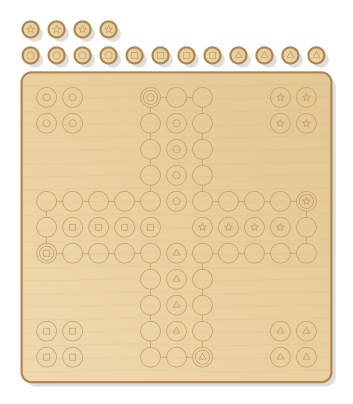
Cross-shaped race board with 40 squares, four homes and four goal lanes, each colour also marked with its own symbol. Plus 16 pawns. Roll, move, knock out: the classic for the whole family.
- Size
- 326 × 378 mm, 6 mm thick
- Material
- Plywood
- Difficulty
- Beginner
- Milling time
- approx. 29 min
- Bits
- V-bit 60°, End mill Ø 3.175 mm
- Customise
- Size, text and details adjustable with sliders
- With a laser
- diode laser from about 10 W (cuts 6 mm)
Try it without an account · carve with Chrome or Edge · no installation
Build instructions
Materials and accessories
| Qty | Part |
|---|---|
| 1 | Wood paints or acrylic paints |
Also: sandpaper (grit 120 and 240), a utility knife or fine saw and, for joints, a rubber mallet.
Carving and finishing
- Clamp the workpiece flat on the spoilboard or secure it with double-sided tape, and set the origin as shown in the carving assistant.
- Engrave squares, path and symbols, then cut out the board and the pawns.
- Free the parts at the holding tabs with a utility knife or fine saw and sand the tab remains flush.
- Lightly break the edges with sandpaper (grit 120, then 240) and remove burrs.
Assembly and final touches
- Paint homes, start squares, goal lanes and four pawns each in four colours; the symbols also help children who mix up colours.
- Whoever rolls a six puts a pawn on the start square. Move clockwise; landing on an occupied square sends the other pawn back home. The first to get all four into the goal wins.
How to carve this template
- OpenOpen the template in the app and adjust size and text if you like.
- CheckLook at it in 3D, check run time and warnings.
- Set upThe carve wizard guides you through material, clamping, bit and zero point.
- CarvePress start; the app drives your Grbl router directly over USB.