myWerkzeug.de › CNC.myWerkzeug.de › Templates › Learning
CNC template · Learning
Fit test for slot joints
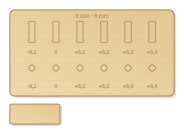
Test plate with six slots and six holes in fine steps around the measured material thickness and the dowel. This way you find the right clearance before you mill a box or a shelf.
- Size
- 180 × 130 mm, 6 mm thick
- Material
- Plywood
- Difficulty
- Beginner
- Milling time
- approx. 9 min
- Bits
- V-bit 60°, End mill Ø 3.175 mm
- Customise
- Size, text and details adjustable with sliders
- With a laser
- diode laser from about 10 W (cuts 6 mm)
Try it without an account · carve with Chrome or Edge · no installation
Build instructions
Materials and accessories
| Qty | Part |
|---|---|
| 1 | Beech dowel rod 6 mm |
Also: sandpaper (grit 120 and 240), a utility knife or fine saw and, for joints, a rubber mallet.
Carving and finishing
- Clamp the workpiece flat on the spoilboard or secure it with double-sided tape, and set the origin as shown in the carving assistant.
- Measure the material thickness at several points with the calliper beforehand and enter the average. Then engrave, mill slots and holes and finally cut out plate and test tongue.
- Free the parts at the holding tabs with a utility knife or fine saw and sand the tab remains flush.
- Push the test tongue into the slots one after another, and a dowel into the holes.
Assembly and final touches
- The right clearance is the first slot the tongue goes all the way into with light pressure and sits without wobbling; enter the number below it as clearance in the templates.
- For glued joints choose one step more, for joints without glue (inserts, games) the tight step.
How to carve this template
- OpenOpen the template in the app and adjust size and text if you like.
- CheckLook at it in 3D, check run time and warnings.
- Set upThe carve wizard guides you through material, clamping, bit and zero point.
- CarvePress start; the app drives your Grbl router directly over USB.