myWerkzeug.de › CNC.myWerkzeug.de › Templates › Learning
CNC template · Learning
Pythagoras puzzle to prove it
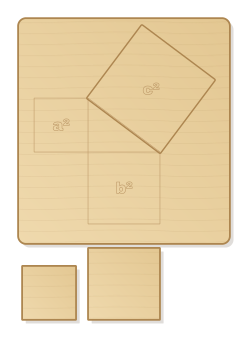
Pythagoras' theorem to touch: the square on the shorter leg and the four pieces of the square on the longer leg exactly fill the square on the hypotenuse. With tray and engraved triangle.
- Size
- 220 × 318 mm, 5 mm thick
- Material
- Plywood
- Difficulty
- Beginner
- Milling time
- approx. 14 min
- Bits
- V-bit 60°, End mill Ø 2 mm, End mill Ø 3.175 mm
- Customise
- Size, text and details adjustable with sliders
- With a laser
- diode laser from about 8 W (cuts 5 mm)
Try it without an account · carve with Chrome or Edge · no installation
Build instructions
Apart from the workpiece you need nothing else.
Carving and finishing
- Clamp the workpiece flat on the spoilboard or secure it with double-sided tape, and set the origin as shown in the carving assistant.
- Engrave triangle and leg squares, cut the large leg square with the 2 mm end mill, then cut out recess, pieces and tray.
- Free the parts at the holding tabs with a utility knife or fine saw and sand the tab remains flush.
- Lightly break the edges with sandpaper (grit 120, then 240) and remove burrs.
Assembly and final touches
- Glue the tray onto a second sheet or leave it open. First lay the five pieces on the engraved leg squares, then all of them together into the square on the hypotenuse.
- This shows a² + b² = c²: the areas of the two small squares together are exactly that of the large one. The dissection is by Henry Perigal (1873).
How to carve this template
- OpenOpen the template in the app and adjust size and text if you like.
- CheckLook at it in 3D, check run time and warnings.
- Set upThe carve wizard guides you through material, clamping, bit and zero point.
- CarvePress start; the app drives your Grbl router directly over USB.