myWerkzeug.de › CNC.myWerkzeug.de › Templates › Technology and experiments
CNC template · Technology and experiments
Truss bridge for load testing
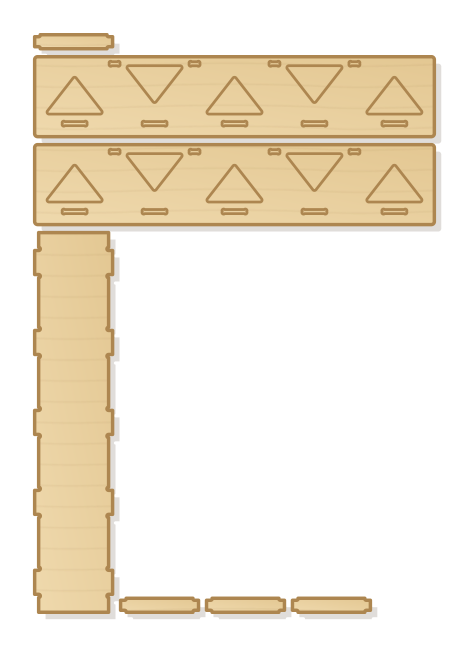
Bridge of two trusses with triangular windows, a tenoned deck and cross ties. Shows why triangles are rigid: loaded with weights it holds many times its own weight. Span and height adjustable.
- Size
- 416 × 594 mm, 4 mm thick
- Material
- Plywood
- Difficulty
- Intermediate
- Milling time
- approx. 26 min
- Bits
- End mill Ø 3.175 mm
- Customise
- Size, text and details adjustable with sliders
- With a laser
- diode laser from about 6 W (cuts 4 mm)
Try it without an account · carve with Chrome or Edge · no installation
Build instructions
Materials and accessories
| Qty | Part |
|---|---|
| 1 | Wood glue (water-resistant D3) |
Also: sandpaper (grit 120 and 240), a utility knife or fine saw and, for joints, a rubber mallet.
Carving and finishing
- Clamp the workpiece flat on the spoilboard or secure it with double-sided tape, and set the origin as shown in the carving assistant.
- Mill the triangular windows and mortises, then cut out trusses, deck and cross ties.
- Free the parts at the holding tabs with a utility knife or fine saw and sand the tab remains flush.
- Before gluing, dry-fit everything. If a joint is too tight, increase the clearance by 0.05 mm and carve the part again; if it wobbles, reduce it.
Assembly and final touches
- Insert deck and cross ties with their tenons into both trusses and glue; the trusses stand vertical and parallel.
- Lay the bridge across a gap between two tables or stacks of books and load it in the middle, for example with books or water bottles. Increase carefully and watch which members are in tension and which in compression.
How to carve this template
- OpenOpen the template in the app and adjust size and text if you like.
- CheckLook at it in 3D, check run time and warnings.
- Set upThe carve wizard guides you through material, clamping, bit and zero point.
- CarvePress start; the app drives your Grbl router directly over USB.